
Hotel Voucher Management for DMCs: From Chaos to One Click
Hotel vouchers are the workhorses of tour operations. When they are wrong, late or missing, the cost ranges from embarrassing to expensive. Here is how Sri Lankan DMCs fix the voucher process.
Travify Team
Travel Operations Experts · April 13, 2026 · Updated October 6, 2026
In short: Hotel voucher management is the process of issuing, sending, amending and tracking the confirmation documents a DMC sends to each hotel on an itinerary. Manual Word-template vouchers invite re-typing errors, lost amendments and untracked sends. Generating every voucher from the booking record, emailing it from a connected inbox and logging hotel confirmations removes those failure points and gives you a timestamped trail for cancellation disputes.
A destination management company (DMC) is the inbound tour operator that books hotels, transport, guides and activities on the ground for overseas travel agents. Every confirmed booking it handles produces a hotel voucher for each property on the itinerary. A tour with stops in Sigiriya, Kandy, Ella and Galle means four vouchers to create, send, confirm and keep current through every amendment.
Key takeaways
- A hotel voucher is the binding confirmation between a Sri Lankan DMC and a hotel; it must carry guest names, dates, nights, room type, meal plan, special requests, a reference number and a New, Amended or Cancelled status.
- The expensive failures are re-typing errors, amendments that never reach one hotel, forgotten vouchers in the December to March peak, and sends nobody can prove in a no-show dispute.
- DMCs issue three document types: hotel vouchers to properties, supplier vouchers to activity and transport providers, and a customer confirmation to the traveler or agent.
- Generating vouchers from the booking record instead of re-typing them removes copy-paste errors and turns an amendment into a regenerate-and-resend step.
- A send record with timestamp and recipient, plus a hotel-confirmed tick, turns "we sent it" into "they have it".
What is a hotel voucher and why does it matter for a Sri Lankan DMC?
A hotel voucher is the document a DMC sends to a hotel to confirm a reservation made under the DMC's contract rates; the hotel treats it as the instruction to hold the room and bill the DMC rather than the guest. It matters because a wrong or missing voucher means a traveler arriving at a property that is not expecting them, in a season when spare rooms are scarce.
For most DMCs the process still means opening a Word template, typing guest names, dates, room types, meal plans and special requests, saving a PDF and emailing it. Repeated for every hotel on every booking, it is tedious and error-prone, yet it has to be right every time.
Why does manual hotel voucher creation go wrong?
Manual voucher creation fails not because teams cannot make vouchers but because every step re-enters data that already exists and leaves no shared record of what was sent. Six problems recur:
- Data re-entry: guest names, dates and room details already sit in the booking or costing, yet someone types them again into a template. Every re-entry is a chance for a typo.
- Copy-paste errors: the most dangerous kind. A voucher from a previous booking is reused, most fields are updated and one is missed, so the hotel receives the wrong guest name or check-in date.
- No send tracking: was it sent, when, by whom, and did the hotel confirm? In a manual process those answers live in individual inboxes, not in a central record.
- Amendment chaos: when an agent changes dates, room types or guest counts, the original voucher must be amended and resent. Knowing which version a hotel holds becomes guesswork.
- Forgotten vouchers: in the December to March peak, vouchers fall through the cracks. A hotel that never received one discovers the booking only when the guest arrives, and the scramble often ends in an upgrade at your cost.
- No cancellation trail: when a booking cancels, every hotel on the itinerary needs a cancellation notice. Miss one and you may be charged for a no-show.
A single missed hotel voucher in peak season can cost a DMC an emergency rebooking, a room-upgrade charge or a no-show penalty that wipes out the margin on that stop. With Sri Lanka recording 277,000 arrivals in January 2026 alone, hotel availability is tight and voucher mistakes are more expensive than ever.
What should a hotel voucher contain?
A hotel voucher should contain guest names, check-in and check-out dates, nights, room type and quantity, meal plan, special requests, a reference number, your contact details and a status. The table shows why the hotel needs each field and the error that most often creeps in.
| Voucher field | Why the hotel needs it | Common manual error |
|---|---|---|
| Guest name(s) with honorifics | Registration and welcome | Misspelled names, missing co-travelers |
| Check-in date | Room allocation and preparation | Wrong date format, off-by-one errors |
| Check-out date | Room blocking and billing | Mismatched with itinerary |
| Number of nights | Cross-check against dates | Inconsistent with check-in/check-out |
| Room type and quantity | Correct room assignment | Wrong category, missing extra-bed request |
| Meal plan | Restaurant and kitchen preparation | BB quoted when HB was costed |
| Special requests | Guest preferences and needs | Not carried over from the agent inquiry |
| Voucher reference number | Tracking and reconciliation | Missing or duplicate references |
| DMC contact details | Hotel can reach you with issues | Outdated phone number or email |
| Voucher status | New, Amended or Cancelled | Amended voucher sent without a clear label |
What are the three types of vouchers a DMC sends?
A DMC sends three distinct voucher types: hotel vouchers to properties, supplier vouchers to activity and transport providers, and a customer confirmation to the traveler or their travel agent.
Hotel vouchers
Hotel vouchers confirm a reservation with the property and are generated from the accommodation data in the booking. Each carries a status of New, Amended or Cancelled so the hotel knows what action to take; when dates or room types change, an amended voucher replaces the original.
Supplier vouchers
Supplier vouchers confirm activities, excursions and other services with third-party providers. A supplier voucher for a Yala safari lists the date, number of guests, pick-up time, vehicle requirements and special instructions. They need the same sent-and-confirmed tracking as hotel vouchers; see our guide to supplier voucher management.
Customer confirmation vouchers
A customer confirmation voucher is the client-facing summary of every hotel, activity and service in the package, sent to the end customer or their travel agent. It is the traveler's reference document on the road, so it must match the hotel vouchers exactly.
Copy the booking agent on every hotel voucher. The agent gets documentation for their records, can verify details match what was agreed, and sees your process working. It is a small habit that builds trust with international B2B partners and cuts follow-up questions.
How much time does automated voucher generation save?
Generating vouchers from the booking removes most of the per-voucher labour, because typing, PDF saving and email composing collapse into selecting the booking and pressing send. The table is an illustrative example for a 10-night booking with five hotel stops, not a measured benchmark.
| Voucher task | Manual process (illustrative) | Generated from the booking (illustrative) |
|---|---|---|
| Create 5 hotel vouchers | 45-60 min (open template, type details, save PDF, repeat) | 2 min (select booking, generate all vouchers) |
| Send to hotels | 15-20 min (compose 5 emails, attach PDFs) | 3 min (send from connected email, CC the agent) |
| Track confirmations | Check inbox manually, update personal notes | Send status and timestamps recorded automatically |
| Handle an amendment | 15-20 min (find original, modify, save new PDF, resend) | 2 min (update booking data, regenerate as an Amended voucher, resend) |
| Cancel a hotel | 10 min (create cancellation notice, send, track) | 1 min (generate a Cancellation voucher, send) |
| Total per booking | 85-110 min | 8-10 min |
Across a month of bookings that adds up to a meaningful share of one reservations staff member's time. The bigger win is risk: when voucher data comes from the booking record, the voucher cannot disagree with the booking.
How do you handle hotel voucher amendments without losing track?
Handle amendments by changing the booking record once, regenerating the affected vouchers with an Amended status, and resending them with a note on what changed. Manual processes break down here, because a booking commonly changes several times between confirmation and travel: rooms get upgraded, dates shift, a night is added, a name is corrected. Each manual amendment requires:
- Finding the original voucher file (which folder was it in?)
- Updating the relevant fields
- Clearly marking it as Amended so the hotel knows to replace the original
- Resending to the hotel with an explanation of what changed
- Updating your internal records to reflect the current state
With five hotel stops and three amendments, that is fifteen individual voucher updates on one booking. Miss one and a hotel holds outdated information: the guest arrives expecting a Deluxe room and the hotel has a Standard reserved because the upgrade was never sent.
Every voucher should carry one of three statuses: New (first issue), Amended (replaces a previous version) or Cancelled. Hotel reservations desks process high volumes and need to know instantly whether a document is a new reservation, a change or a cancellation. Never send a modified voucher without the Amended label; it causes confusion and delays at the front desk.
Why does voucher send tracking matter in a no-show dispute?
Send tracking matters because a timestamped record of when a cancellation voucher went out, and to which address, is the evidence that decides whether a hotel's no-show charge stands. In a manual process, "sent" means "I believe I emailed a PDF", which leaves five questions open:
- Was it actually sent, or is it still sitting in drafts?
- Was it sent to the correct email address at the hotel?
- When exactly was it sent? This decides cancellation-policy compliance.
- Who on your team sent it?
- Was the hotel's confirmation reply received and logged?
Without a central send record, answering them means digging through individual email accounts. The cancellation deadline itself is usually buried in the hotel's rate document, which is why hotel rate management and voucher tracking belong in the same system.
How Travify generates and tracks hotel vouchers
Travify generates hotel vouchers from the booking record, emails them from your own connected Gmail or Outlook, and records each send and each hotel confirmation against the booking.
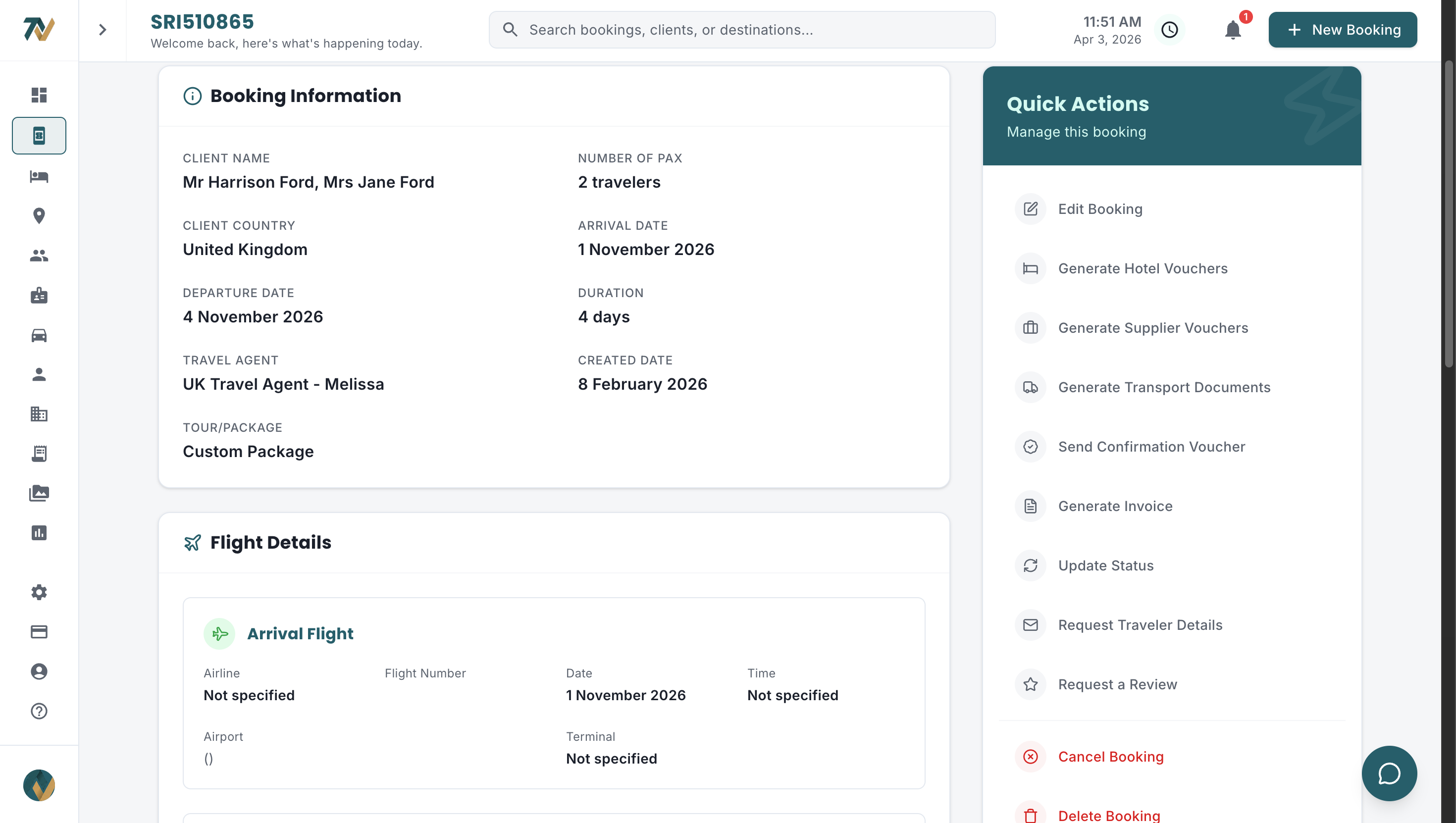
- No re-typing: hotel vouchers are generated from the booking's accommodation data. Check-in and check-out dates, room types, meal plans and guest names are pulled directly, so copy-paste errors disappear.
- Three document types: hotel vouchers from accommodation data, supplier vouchers from activities and expenses, and a customer confirmation voucher for the traveler, each carrying a New, Amended or Cancelled status.
- Sent from your own inbox: vouchers go out through your connected Gmail or Outlook account with the booking agent in CC, so there is no download-then-attach step.
- Send history on the voucher: each send is recorded with the time, the recipient address and the team member who sent it. The same record is kept for invoices and other documents.
- Hotel-confirmed tick: when the hotel replies, you tick the voucher as confirmed. That is the difference between "we sent it" and "they have it".
- Unconfirmed-voucher reminders: a voucher still unconfirmed after a set number of days (three by default, adjustable in notification settings) triggers a daily reminder until it is ticked, so silence from a property surfaces before check-in.
- Amendments by regeneration: update the booking data and generate the voucher again, choosing the Amended type so the hotel knows it replaces the original.
- Recipient pre-filled: the send form pre-fills the recipient from the matched hotel's reservation email (each accommodation is matched to a saved hotel automatically when vouchers are generated), so you are not looking up the contact for a property you have booked forty times.
- Record kept: a voucher that has already been emailed cannot be deleted, so the trail of what a hotel received stays intact.
- Cancellation alert: if a booking is cancelled after vouchers have already been sent, an urgent, mandatory Cancellation Vouchers Required notification (bell and email) fires immediately and repeats daily until a cancellation voucher is generated and sent for each affected hotel.
Cancellation deadlines in one place
A Cancellation deadlines button on the hotel vouchers page lists every hotel in the booking with the last free-cancellation date and the days left, most urgent first, read from the cancellation terms in the hotel's rate document. When an agent asks on a Tuesday whether the client can still drop the last two nights in Galle, you answer in seconds instead of opening three PDFs.
The outcome is a voucher workflow measured in minutes per booking rather than hours, with far fewer missed, incorrect or outdated vouchers because the data never leaves the booking. See Travify plans and pricing, or explore the full document and operations workflow for Sri Lankan DMCs.
Automate your voucher workflow
Stop creating vouchers by hand. Start a free trial of Travify and generate hotel vouchers, supplier vouchers and customer confirmations from the booking in one click.
Start your free trialarrow_forwardFrequently asked questions
Ready to Streamline Your Operations?
Join Sri Lankan travel companies already saving hours every week with Travify.
Related Articles
Supplier Voucher Management: A Guide for Sri Lankan DMCs
A forgotten safari confirmation or an unconfirmed whale-watching trip costs a Sri Lankan DMC money and agent trust. Here is how to manage supplier vouchers from creation to payment.
Hotel Rate Management for Sri Lankan DMCs: Fix the Chaos
If your hotel rates live in email inboxes, PDF attachments and WhatsApp threads, you are almost certainly quoting wrong prices. Here is how Sri Lankan DMCs centralise seasonal rates and stop the margin leak.
Invoice Generation for DMCs: Bill Straight From the Costing
Rebuilding each invoice in Word from a costing spreadsheet costs Sri Lankan DMCs days a month and invites bank-detail, VAT and version errors. Here is how to bill straight from the booking costing instead.