
Excel Is Killing Your Tour Costing: Why DMCs Need Software
Excel was never designed for tour costing. Sri Lankan DMCs lose margin to silent formula errors, waste hours hunting rates and risk bookings on version confusion. Here is what dedicated costing software does differently.
Travify Team
Travel Operations Experts · April 13, 2026 · Updated October 6, 2026
In short: Excel fails at tour costing because hotel, transport and activity rates live in scattered files, formulas break silently, versions multiply, and nothing records who changed what. The result is quotations sent below cost, slow replies to travel agents and no audit trail. Dedicated tour costing software gives a Sri Lankan DMC one rate library, automatic calculations, versioned costings and documents generated from the same data.
If you run a destination management company (DMC) in Sri Lanka, an Excel workbook is almost certainly the backbone of your tour costing. It may be a colour-coded masterpiece with VLOOKUPs and conditional formatting, or a sheet the founder built years ago that everyone has copied since. Either way, it costs more than you realise.
Excel can do almost anything, and that is the problem: almost anything is not the right thing for tour costing. A flexible workbook becomes a fragile bottleneck that slows the team, introduces pricing mistakes and blocks growth. This guide covers the seven failure points, what they cost, what dedicated tour package costing software does differently, and how to make the switch.
Key takeaways
- Scattered rate sources are the biggest cause of below-cost quotations: a stale hotel rate in the workbook goes unnoticed until the supplier invoice arrives.
- Excel formula errors are silent: a deleted row or a SUM range that misses new lines produces a plausible total that nobody questions.
- A spreadsheet cannot hold Draft, Active and Archived versions of one booking's costing, so every variation adds another "FINAL v3" file.
- Nothing in a workbook records who changed a rate, a markup or a date, which makes margin discrepancies impossible to trace at settlement.
- Dedicated tour costing software stores rates once, calculates automatically, versions every costing and generates itineraries, vouchers and invoices from the same data.
- You do not need to abandon Excel overnight: move rate management or document generation first, then the rest of the workflow.
Why does Excel fail at tour costing for Sri Lankan DMCs?
Excel fails at tour costing for seven reasons: scattered rates, version confusion, silent formula errors, no clean duplication, no audit trail, weak collaboration and manual document generation. Each one shows up daily at a Sri Lankan DMC or inbound tour operator, the local company that packages hotels, transport, guides and activities for overseas travel agents.
1. Rates are scattered across emails, PDFs and WhatsApp
Hotel partners send rate sheets by email as Excel files, PDFs or photos in WhatsApp. A transport supplier confirms a new vehicle rate by phone. An activity provider updates group pricing in a message you read on your mobile at lunch. Some of these rates reach the master workbook; some never do.
A team member building a costing on a Tuesday morning may be pulling rates from three sources with three different update dates. Peak-season supplements for December stays in Galle or Ella are the ones most often missed. See hotel rate management chaos for how a rate library fixes this.
A single outdated hotel rate in the workbook means quoting below cost on every night of that stay, and a multi-night, multi-pax itinerary multiplies the gap. You will not know it happened until the supplier invoice arrives.
2. Version control is a nightmare: which "FINAL" file is current?
Which file is current: "Sri Lanka Costing v3 FINAL.xlsx", "Sri Lanka Costing v3 FINAL (2).xlsx" or "Sri Lanka Costing v3 FINAL - Updated Rates March.xlsx"? Every DMC has sent a quotation from an outdated workbook. The travel agent accepts it, and you are locked into pricing that no longer reflects your costs.
When several people cost tours at the same time, which is every day between December and March, the problem multiplies. Someone overwrites the master template with a client-specific costing. Someone else saves changes to a local copy that never syncs back. The single source of truth becomes several sources of confusion.
3. Formula errors are silent and expensive
Excel formulas break without warning. A deleted row shifts a cell reference. A copied formula keeps the old range. A SUM misses the last row because data was inserted below it. The total still looks about right, the reviewer signs off, and the quotation goes out with a margin that is too thin (you lose money) or too fat (you lose the booking).
| Spreadsheet error | How it happens | What it does to the costing |
|---|---|---|
| Broken cell reference | Row or column inserted or deleted | One line item silently drops out of the total |
| Outdated rate | Rate sheet never copied into the workbook | Every night of that hotel is quoted below cost |
| Wrong date range | Seasonal rate applied to the wrong period | Peak or festive pricing missed for the whole stay |
| Missed supplement | Festive or peak supplement not added | A per-night cost appears on the supplier invoice, not the quote |
| Currency conversion | Manual LKR to USD entry, decimal place error | Selling price wrong by a multiple, not a margin |
| SUM range error | New row added outside the formula range | An entire cost category is omitted |
4. You cannot duplicate a costing cleanly
A travel agent asks for a variation: the same itinerary for 6 pax instead of 4, or Hotel A swapped for Hotel B. In Excel you either edit the original (and lose it) or copy the file (and add to the version pile). There is no clean way to keep several versions of one booking's costing with a clear status showing which is the draft, which went to the agent and which is archived.
5. There is no audit trail
Who changed the day-3 hotel rate? Did someone lower the markup before the quotation went out? A workbook keeps no history. When a margin discrepancy surfaces weeks later at settlement, the post-tour reconciliation of revenue against actual supplier costs, there is nothing to trace.
6. Collaboration is limited, even in Google Sheets
Even in a cloud spreadsheet, two people editing one costing overwrite each other's work. There is no way to mark which costing went to the agent, no ownership by tour designer, and no roles that let a junior edit only their own work.
7. Document generation is manual
Once the costing is done, the documents still have to be made: the itinerary and price for the agent, hotel and supplier vouchers, the invoice. From Excel that means copy-pasting into Word templates, formatting by hand and exporting PDFs, and copy-paste errors creep in with every document.
What does spreadsheet costing actually cost a DMC?
Spreadsheet costing costs a DMC in four ways: labour spent on lookups and formatting, errors found only at reconciliation, bookings lost to slow replies, and quotations sent on stale rates. The amounts depend on volume, but the categories are the same at every size.
- Hours each week on work software can do: rate lookups, manual calculation, document formatting and formula checking
- Costing errors that surface only at post-tour reconciliation, each one a direct hit to margin
- Enquiries lost because a manual costing takes hours while a competitor replies to the travel agent first
- Quotations sent with outdated rates or broken calculations that then have to be honoured
Added up over a year, the total is usually far larger than the owner assumes. We break the error categories down in the real cost of tour costing errors.
Track the hours your team spends each week on Excel-based costing: rate lookups, data entry, formula checking, document creation and error correction. Multiply by your average hourly labour cost, then add the margin lost on last quarter's known errors. The figure is almost always larger than the owner expects.
What does dedicated tour costing software do differently?
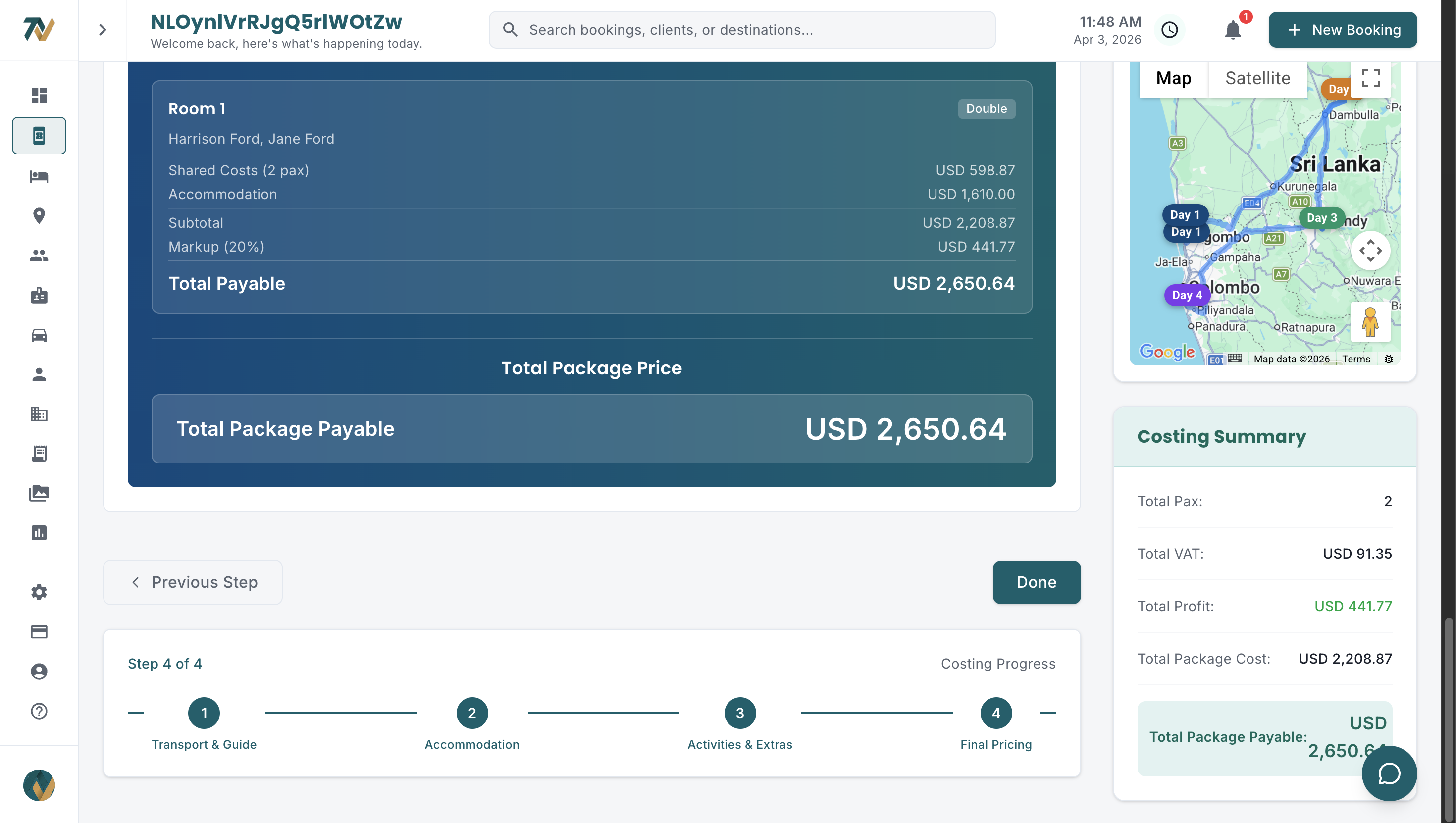
Dedicated tour costing software stores every rate once, calculates every line automatically, keeps versioned costings per booking and generates documents from the same data. It is not a better spreadsheet; it is a guided workflow built around how a tour is actually priced.
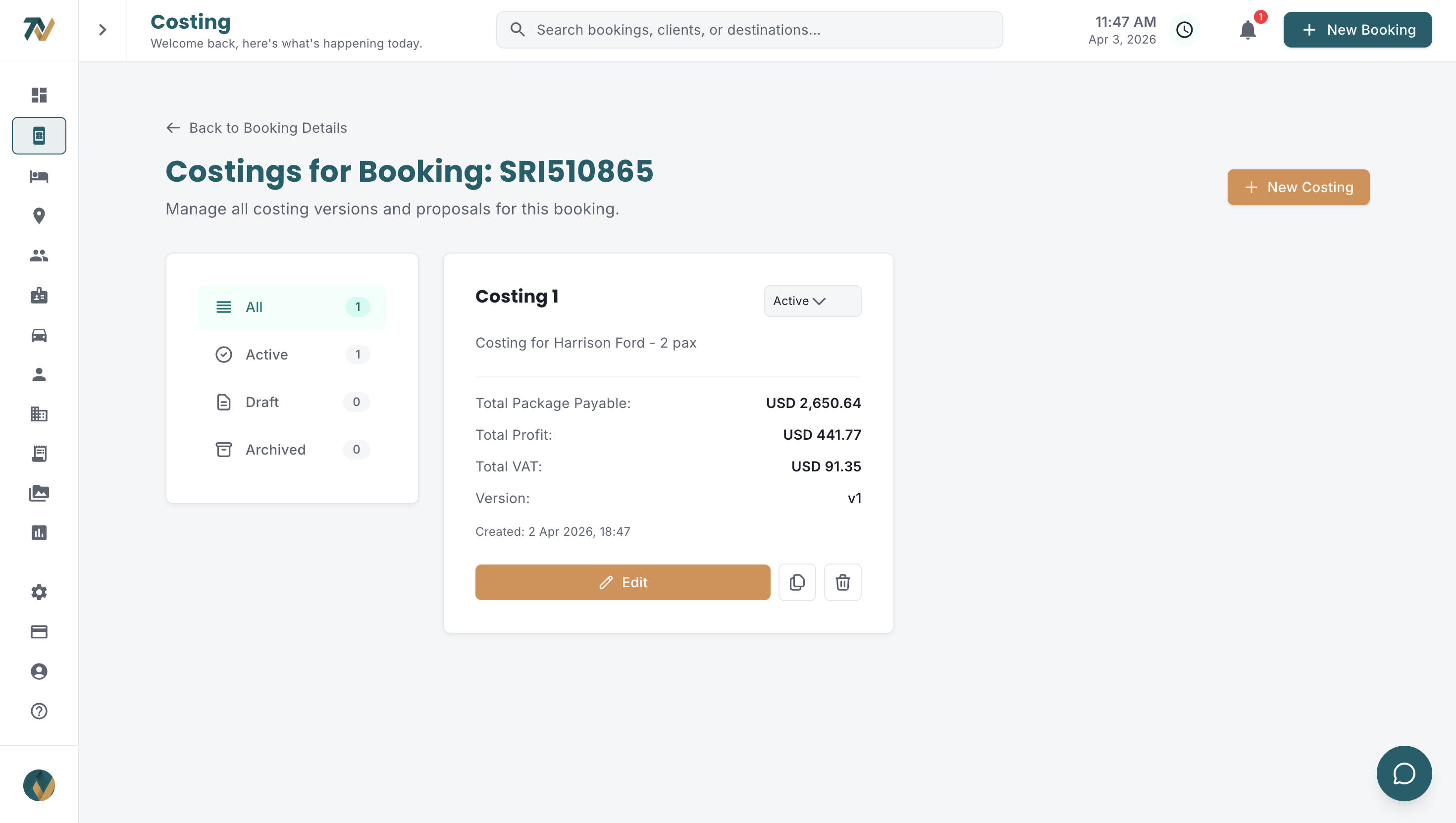
- A central rate library where hotel contracts, vehicle per-kilometre rates and activity prices are stored once and picked inside the costing, with no digging through emails and PDFs
- Versioned costings with Draft, Active and Archived status, so everyone knows which version is current and which went to the agent
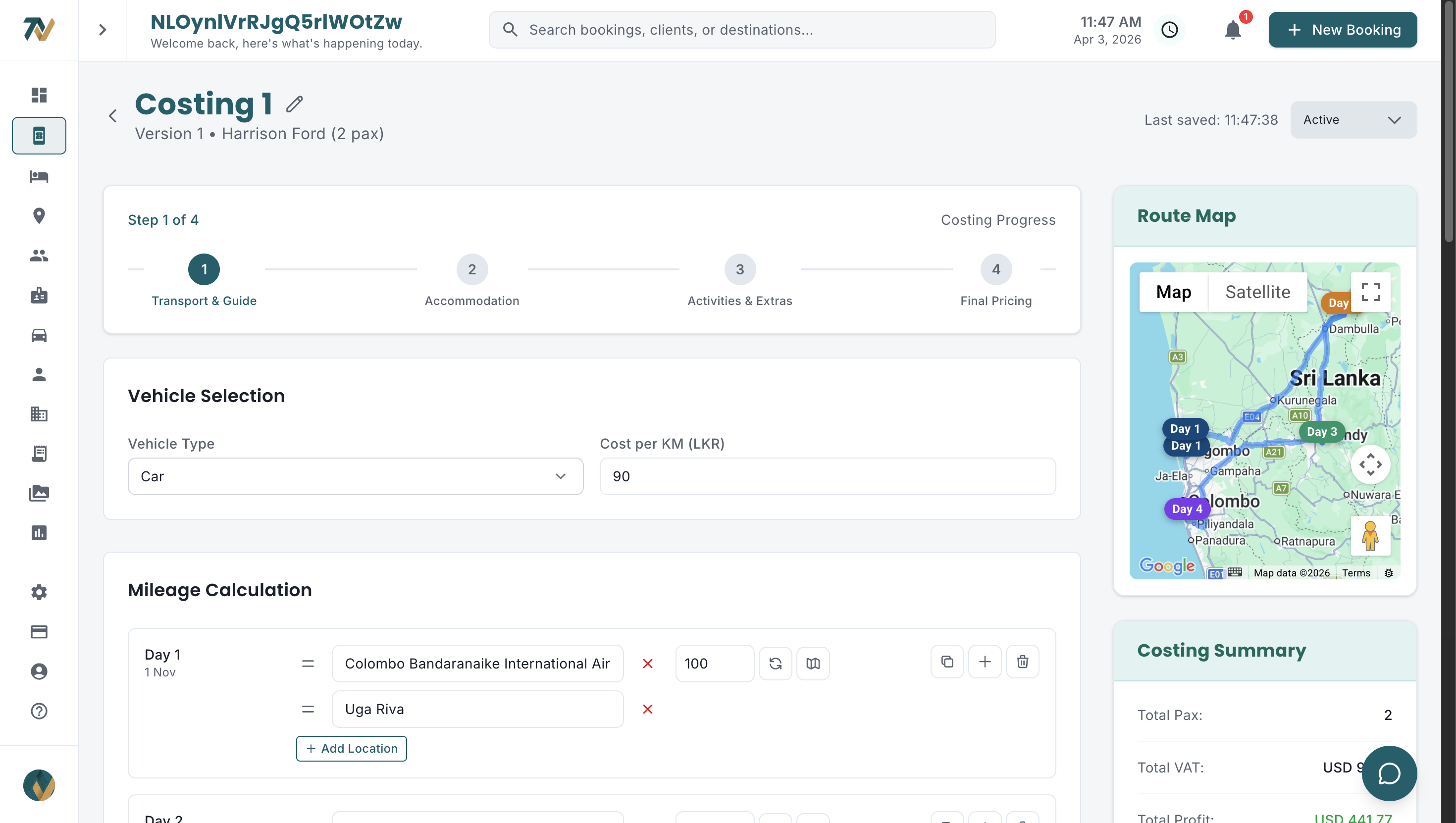
- Automatic calculations for hotel nights, transport mileage, per-person and per-group activities, guide daily rates, markup and VAT, with no formulas to break
- One-click duplication, so a variation (different pax, alternative hotel, shifted dates) takes minutes instead of a fresh build
- An expense catalogue of reusable items (airport transfer, Sigiriya entrance, Yala safari jeep) with pricing preset per person or per group
- Documents generated from the costing data: branded itinerary, hotel and supplier vouchers and the invoice, all formatted consistently
Excel vs dedicated tour costing software: how do they compare?
Dedicated software beats Excel on every capability that decides margin and reply speed. The right-hand column below describes purpose-built tour costing software of the kind Travify provides.
| Capability | Excel | Dedicated tour costing software |
|---|---|---|
| Rate management | Manual entry from scattered sources | Searchable hotel database; rates extracted from contracts into each hotel's Rates tab and picked inside the costing |
| Version control | File naming conventions, unreliable | Draft, Active and Archived versions per booking |
| Calculation accuracy | Formula-dependent, error-prone | Automatic line totals, markup and VAT |
| Costing duplication | Copy file, adjust by hand | One-click duplicate, then edit |
| Audit trail | None | Append-only Change Log on the booking |
| Document generation | Manual Word and PDF export | Itinerary, vouchers and invoice from costing data |
| Collaboration | File sharing, overwrite risk | Roles, booking ownership, one Active version per booking, and a prompt when someone else saved changes to the costing you are editing |
| Pax-based pricing | Manual recalculation | Per-person and per-group items recalculated automatically |
| Currency | Manual conversion, exchange-rate risk | LKR costs (activity and expense lines in LKR or USD), a per-costing LKR to USD rate seeded from the company default, USD selling price |
| Scalability | Degrades with volume | Built for peak-season volume |
Why do DMCs hesitate to leave Excel, and do the objections hold up?
DMC owners raise the same three objections: the team is comfortable with Excel, years went into the templates, and subscriptions are an ongoing cost. Each is valid, and each has a practical answer.
"My team is comfortable with Excel"
Comfort is not efficiency. The team is comfortable because it has adapted to Excel's limits with workarounds that cost time and introduce errors. Purpose-built software follows the steps a tour designer already knows (transport, hotels, guides, activities, markup), so the learning curve is the screens, not a new way of working.
"We have invested years in our spreadsheet templates"
That is the sunk cost fallacy. The time spent on the templates is already gone. The question is whether continuing to maintain formulas and fix broken references is the best use of the team's hours, or whether those hours belong in agent relationships and better itineraries.
"Software subscriptions are an ongoing cost"
So is Excel; its cost is just hidden in labour, errors and lost bookings. A single prevented below-cost quotation, or one booking won by replying first, covers a long stretch of subscription. Travify plans start at $24 per month for a two-user Solo team, and every plan starts with a free trial.
How do you move tour costing off Excel without disrupting the team?
Move one pain point at a time: rates first, then costings, then documents. A staged switch keeps quotations flowing even if you start during the December to March peak.
- Load hotel contracts and rate sheets into a rate library first, so the team stops hunting for rates before it stops using the workbook.
- Import directory data (travel agents, suppliers, guides, vehicles, expense catalogue) from the existing spreadsheets instead of retyping it.
- Cost the next new enquiry in the new system with Excel open for reference, and compare the two totals once.
- Switch document generation so the itinerary, vouchers and invoice flow straight from the costing data to the agent and suppliers.
- Archive the workbooks as read-only history and set one rule: live quotations come only from versioned costings.
How Travify replaces your costing spreadsheet
Travify replaces the costing workbook with a guided, multi-step costing tied to the booking file: rates are picked from a library, every line is calculated automatically and the documents are generated from the same data.
- Draft, Active and Archived versions on every costing, with only one Active at a time, so there is never a "FINAL v3" question about which version went to the agent
- Guided steps for transport, hotels, guides, activities and other expenses, with markup % and VAT applied automatically and no formulas to break; qualifying brand combo-offer discounts can be applied in the costing, and group costings price the single supplement and triple reduction
- One-click duplication to build a variation without losing the original
- An expense catalogue of reusable activity and expense templates, priced per person or per group
- An append-only Change Log on the booking file, so you can see who changed what and when
- All costs in LKR with a per-costing LKR to USD rate producing the USD selling price, plus client-facing itinerary prices shown in the client's home currency at a rate frozen on the costing
- Saved hotel rates picked straight from the Rate Document Library, where AI has already extracted seasonal date ranges, occupancy prices and meal plans from your uploaded contracts; the rate picker ranks them by how well they match the stay's travel date, meal plan, room type and occupancy
- Automatic distance and mileage by vehicle type with your own configurable per-kilometre rates, so transport is priced against your actual fleet (see the hidden cost of manual mileage calculation)
- AI auto-fill that turns a typed or dictated description, or one click from the booking, into a reviewable costing draft; the pricing is still calculated by the system
- Branded day-by-day itinerary, hotel and supplier vouchers and invoices generated from the costing, emailed from your own connected Gmail or Outlook
The goal is not to replicate Excel. It is to give the team what a workbook cannot: a system that understands tour costing and does the mechanical work, so people can spend their time on the itineraries and agent relationships that win bookings. See the full workflow on the Travify solutions page.
Ready to break free from spreadsheet costing?
See how Travify replaces scattered spreadsheets with a unified tour costing system. Start your free trial today: no credit card required, no data migration headaches.
Start Your Free Trialarrow_forwardFrequently asked questions
Ready to Streamline Your Operations?
Join Sri Lankan travel companies already saving hours every week with Travify.
Related Articles
Tour Package Costing: Step-by-Step Guide for Sri Lankan DMCs
Every cost component of a Sri Lankan tour package, worked on a 7-night, 2-pax circuit: hotels, mileage, activities, guides, supplements, markup, VAT and currency conversion, with the formulas in the right order.
Tour Costing Errors: What They Really Cost a Sri Lankan DMC
A wrong hotel season, a missed half-board supplement, a forgotten park fee: small tour costing errors compound into lost margin on every booking. Here is what they cost Sri Lankan DMCs and how to stop them.
Hotel Rate Management for Sri Lankan DMCs: Fix the Chaos
If your hotel rates live in email inboxes, PDF attachments and WhatsApp threads, you are almost certainly quoting wrong prices. Here is how Sri Lankan DMCs centralise seasonal rates and stop the margin leak.